

Ticket management
ServiceNow, Jira


One case. One context. One interface. Caller, ticket, device, permissions, knowledge and remote support in one window — instead of six open programs.
Developed in Austria
navarodesk is the central hub on top of the systems you already have.

 navarodesk
The ticket system stays in the lead. navarodesk reads tickets and customers and writes the closure back.
Who is calling, which groups, which permissions: straight from the directory.
Status, missing updates and software deployment per device.
navarodesk registers like a desk phone. The call opens the case with caller ID.
The AI behind NAVO: call analysis, suggestions, ticket closure.
Remote support is built in. TeamViewer, AnyDesk or RustDesk can stay: navarodesk still documents case, consent and closure.
See outages and network status in the same case.
Patch status and audit today, antivirus and backup next.
Knowledge and inventory where the case gets solved. Knowledge articles also from ServiceNow, Freshservice, HaloPSA, Dynamics 365 and Zammad.
Emails and follow-up questions where the case lives.
ServiceNow, Jira
Live from Entra ID
Compare, time-limited
Packages in rollout rings
Articles right in the case
Listens in, suggests
navarolink pro, included
The call opens the case
Companies and sites
Status and updates
Servers and services
Checksum chain, NIS-2
Remote access requested
Connect with navarolink pro, with consent on the device and an entry in the audit. Remote Desktop remains as the fallback.

 The same remote support is free for helping privately.
navaro.link
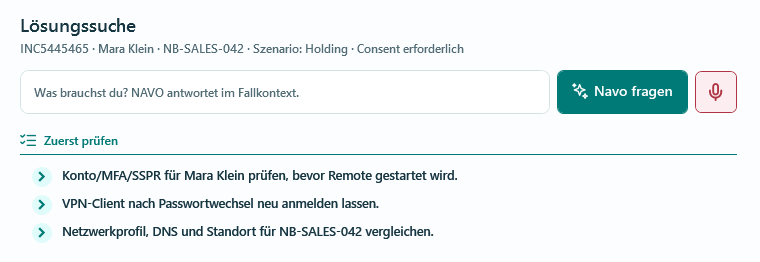
NAVO analyses the ongoing call, suggests checks, fetches matching knowledge articles and pre-fills the ticket closure. Access remains a deliberate decision by the technician.

Prices per support user, calculated for you.
€79 per support user / month
billed monthly · €71/month billed annually · from the first user
€69 per support user / month
billed monthly · €62/month billed annually · one-time setup
+ €249 / month
add-on to Cloud · separate environment
Limited places for companies with 500 to 2,500 employees and for IT service providers: joint setup, a direct line and your cases first. We discuss the terms in a call.
Net prices excluding VAT for monthly billing; annual billing is 10 % cheaper. No minimum purchase, 15 % volume price from 25 support users, larger teams on request.
Remote support shows the screen. navarodesk prepares the support case: ticket, person, device, permissions, knowledge, consent and audit are connected before and during the session.
navarodesk replaces your remote support tool. Ticket system, AD/Entra, device management, knowledge and monitoring stay in place as connected systems.
NAVO condenses problem, actions, result and time into a closing note. After your review, navarodesk hands the comment, status and optionally the time entry to the leading ticket system.
Not publicly yet. navarodesk is set up together with you in the pilot; the signed installation package comes with the pilot agreement. Currently only navarolink is publicly available for download, in three packages on dl.navarodesk.com.
NAVO brings knowledge articles, similar cases, diagnostic paths and quick notes into the support and remote cockpit. Access always remains a deliberate decision by the support technician. Behind it is Google Gemini via the paid API with a data processing agreement. Passwords are masked before sending, and command-line output only goes to NAVO on an explicit click.
Connected: ServiceNow, Jira Service Management, Freshservice, HaloPSA/HaloITSM, Dynamics 365 Customer Service, Zammad, TOPdesk, Matrix42 Service Management and Znuny/OTRS, plus any ticket system with a REST API and tickets by email. Customers come along too, for example from ServiceNow, HaloPSA or Zammad. In preparation: OMNITRACKER and others. The ticket system always stays the leading system.
With real accounts and real data: Microsoft Entra ID (people, groups, photos, also with write access), on-premises Active Directory (people, groups, account status), ServiceNow and Jira (tickets), Microsoft Intune (devices, installed apps, compliance, BitLocker status), Microsoft Configuration Manager (SCCM: devices, online state, inventory), Action1 (devices, missing updates, installed software and vulnerabilities per device), the Microsoft 365 mailbox, Microsoft Teams (presence in the profile, chat and call with one click), telephony via your SIP trunk with caller recognition (any standard SIP provider), Google Gemini as the AI behind NAVO, navarolink pro for remote support and Windows itself (WinRM, SSH, winget) for command line and deployment, including your own packages. Remote Desktop is the fallback; TeamViewer, AnyDesk and RustDesk start from within the case, no interface needed.
Any system that speaks standard SIP. navarodesk registers like a desk phone on the extension and works with any standard SIP provider, for example Magenta Business, A1, hosting-profis, sipgate, Telnyx, easybell and most on-premises systems (e.g. 3CX, Asterisk). The incoming call opens the case with caller ID; dialling and answering happen right in the cockpit.
Remote support is step 4 of 5. The free version navarolink shows the screen — but it does not know who is calling, which device it is, which company, which tickets are open or which account is affected. Steps 1, 2, 3 and 5 stay open, and the log is just a list of connections. In navarodesk the device comes from the case, the session lands in the checksum chain, and navarolink pro is included in the price.
navarolink is the remote support technology behind the remote cockpit, developed in-house. For non-commercial use — family, friends, clubs, schools, public authorities — it is free on navaro.link. Commercial use runs as navarolink pro through navarodesk.
No. navarolink pro uses its own relay and TURN servers run by navarodesk, separate from those of the free version. No shared traffic. The relay only knows addresses; screen, input and files travel encrypted directly between technician and device.
The active case shows the support name, target device, ticket reference and consent status. Only then is the remote start prepared and assigned to the case in the audit trail.
No. The audit documents support actions and their link to the case. navarodesk provides no keylogging or covert screenshots and explicitly rules out such use.
Just-in-time means time-limited access. A permission is requested for a specific purpose, expires automatically and remains traceable in the audit.
Pilot Cloud, private instance and self-hosting. The specific data location and operation are set out in the pilot agreement. Hosting in Austria is a possible option, not a blanket default. The relay and TURN servers for remote support (navarolink pro) are operated by navarodesk itself in every model; a separate relay server at the customer’s site is not planned.
The target environments are Windows-first. WPF and .NET 10 enable a fast desktop interface, deep Windows integration (WinRM, winget, telephony) and a clear separation between core logic and connectors. Installer and updates are signed.
We clarify team size, existing systems, the preferred operating model and one or two typical support cases. Then a limited read-only scope with measurable goals is agreed.
No matching answer found. Describe your question in the form below.
20 minutes, your systems, one typical case.

